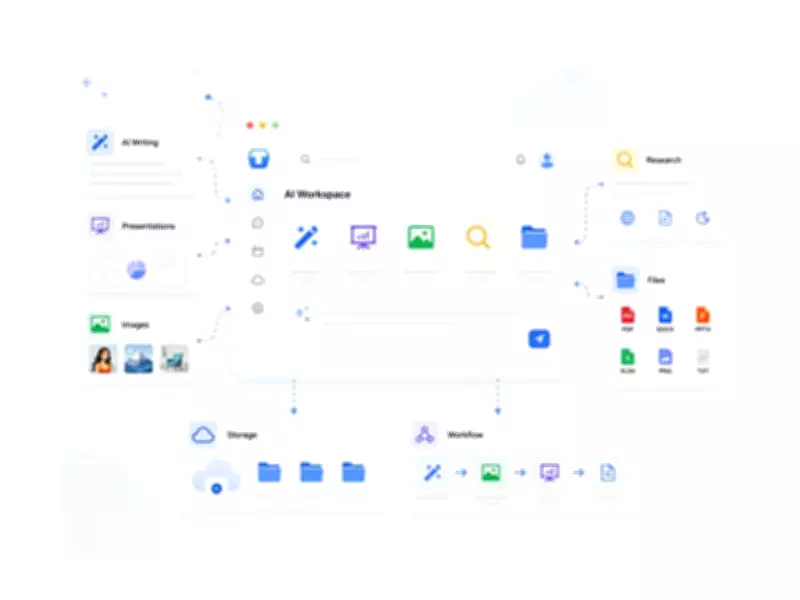
When people search for the best all-in-one AI platform, they are not necessarily looking for the most advanced tool. Instead, they want to avoid the hassle of switching between multiple web pages. You create text in one tab, design slides in another, generate images in a third, convert files in a fourth, and then try to organize everything in a folder. This fragmented workflow is inefficient and quickly becomes overwhelming.
An all-in-one AI platform consolidates these tasks, allowing fewer switches and more productivity. Services like TeraBox have evolved from being mere cloud storage providers into comprehensive AI-driven productivity tools that include writing, presentation creation, image generation, file conversion, and more.
This article explores the features and benefits of TeraBox, how it compares with other leading AI platforms in 2026, and how it can integrate seamlessly into your daily routine.

What Should an All-in-One AI Platform Actually Do?
Before evaluating platforms, it is essential to define what an ideal all-in-one AI solution should offer. Here are some practical requirements:
- Combined AI features: Write, generate images, create presentations, conduct research, and use file tools all under one login.
- A connected workflow: Output from one tool should be easily usable in another without exporting and re-importing.
- Robust file support: Access and use PDFs, pictures, DOCX, and other popular formats within the platform.
- Accessible built-in storage and organization: AI-generated content should be stored and organized in a way that is easy to access.
- Simple to use: Non-technical users should be able to use the platform easily.
Not all platforms marketed as AI workspaces meet these criteria. Some excel in one area but are limited in another. With this checklist in mind, you can better assess whether a platform like TeraBox AI Workspace is worth your time.
TeraBox Is More Than Just Cloud Storage
TeraBox started with a singular focus: providing free cloud storage space. Its primary draw was 1TB of free storage, appealing to users looking for an easy, free way to store files.
That reputation remains, but the product has evolved. TeraBox now includes an AI Workspace feature, a new area that gathers various content generation and productivity tools in one interface.
This change is significant because it alters the value proposition. TeraBox is no longer just a file storage location; it aims to be a platform where you can create and convert files as well. The quality of the tools determines how well this works in practice.
Create, Convert, and Organize Files in One Place
The AI Workspace is where TeraBox's content and file tools reside. It addresses common activities that knowledge workers and creators encounter daily.
AI Presentation
Type in a subject and a prompt, and AI Presentation creates an entire slide deck. This is useful for students working on class homework, professionals preparing meeting overviews, or anyone who needs to create a presentation without starting from scratch. The output typically includes a title slide, section headings, and content slides. The overall structure is generally good, but like most AI-generated presentations, some visual adjustments may be needed before sharing.
AI Writing and Deep Research
The AI Writing tool handles content drafts, rewrites, and text editing. For users who frequently create written content, this feature, combined with cloud storage and presentation options, reduces the need to switch between apps.
Deep Research goes a step further. It helps users collect and organize information on a topic, which is helpful for creating documents or presentations on unfamiliar subjects. Many simple AI tools from other platforms lack this feature.
AI Image and Video Generation
AI Image generation allows creating images from text and image inputs within the platform. This eliminates the need for a separate image generation tool for marketers, creators, or anyone developing visual content.
Video generation is also available, though it is best suited for users who need quick, short-form visuals. It is not a replacement for full video production software.

File Conversion Tools
TeraBox includes a range of file conversion tools for common document and image workflows. Users can convert PDFs into editable Word documents, PowerPoint slides, or Excel sheets, and also turn Word, PPT, Excel, JPG, and PNG files into PDF format. These tasks are often handled with separate online converters, so having them within the same workspace makes file workflows more convenient.
Who Will Get the Most Value from TeraBox?
TeraBox may not be the best option for everyone, but for some users, the synergy between cloud storage and AI workspace tools is highly beneficial. Here is an analysis per user type:
- Students: Those who need to write essays, create presentations, and store files will find the free tier particularly useful.
- Freelancers: Freelancers juggling multiple projects can benefit from the integrated tools for content creation, image generation, and file conversion.
- Small teams: Teams that require shared cloud storage and basic AI productivity tools without complex collaboration features will find TeraBox suitable.
- Individual professionals: Professionals who want to streamline their workflow without paying for multiple subscriptions can use TeraBox as a cost-effective solution.
The AI Workspace features are best suited for users who are already cloud storage users of TeraBox. The free tier offers a risk-free, low-cost experience for new users to explore various workflows.
Getting Started Is Simple
The path to getting started with TeraBox AI Workspace is straightforward:
- Sign up for a free account at terabox.com, or log in to your existing account.
- In the main dashboard, navigate to the AI Workspace section.
- Select the appropriate tool based on your needs: AI Presentation for slides, AI Writing for text, AI Image for images, or file conversion tools for format changes.
- Type in a prompt or upload a file as required.
- Review the output. Most AI-generated results may need some editing before final use.
- Save the output to your TeraBox cloud storage for easy access and sharing.
The interface is simple and user-friendly. Most tools are prompt-driven, so there is little learning curve. New users can complete their first task within minutes.
So, Is TeraBox the Best All-in-One AI Platform Worth Trying in 2026?
For users who want multiple AI tools in one workspace without switching between several services, TeraBox is a practical option. It covers a wide variety of real-world tasks: writing, creating slides, generating visuals, converting files, and storing files.
However, for advanced image generation, a specialized tool like Midjourney will produce better results. Similarly, for complex video editing, dedicated software is necessary.
If you need a solid foundation for multiple tasks and want to avoid jumping between five platforms, TeraBox is a strong contender. The main advantages are free storage, a wide variety of AI features at its price point, and the integration of file conversion and management with content creation. This makes it a worthwhile option for students, freelancers, small teams, and individual professionals.
TeraBox is worth considering as an all-in-one AI platform in 2026, especially for users who want a practical free plan and tools that go beyond text generation.
FAQs
What is the cost of TeraBox?
TeraBox's free plan provides 1TB of cloud storage and access to AI Workspace tools. Paid plans are available for users who need more storage or additional features.
Which AI tools are provided with TeraBox?
TeraBox features AI Presentation, AI Writing, Deep Research, AI Image generation, video generation, file conversion tools, and cloud storage with file management. All are accessible in the AI Workspace section.
What is the difference between TeraBox and Notion/Canva?
Notion focuses on writing and databases, while Canva specializes in graphic design. TeraBox handles a broader range of tasks, offering breadth rather than depth. If you want a tool that covers many functions, TeraBox is a good choice.
Do I need technical skills to use TeraBox AI tools?
No. Most tools are prompt-based and designed for general users. Simply type a subject or upload a file, and the tool does the rest. Outputs typically require light editing.
Can I share files with others from TeraBox?
Yes. TeraBox allows file sharing via links. Documents stored in your cloud storage can be shared with colleagues or clients without them needing a TeraBox account.
Is TeraBox suitable for teams?
TeraBox is best for small teams that need shared cloud storage and AI productivity tools. For larger groups with more complex collaboration requirements, a more enterprise-oriented option may be better.
Conclusion
TeraBox provides a true AI workspace, combining writing, presentations, image generation, file conversion, and cloud storage under a single login, with a usable free tier. Designed for those tired of managing multiple subscriptions, it is worth exploring.
The best way to test it is to try a workflow: create a presentation from a prompt, convert a PDF, generate an image, and store all files in the cloud. Experience how TeraBox's AI tools, file conversion, and cloud storage can fit into your daily routine.
(ADVERTORIAL DISCLAIMER: The above press release has been provided by VMPL. ANI will not be responsible in any way for the content of the same.)
(This content is sourced from a syndicated feed and is published as received. The Tribune assumes no responsibility or liability for its accuracy, completeness, or content.)