

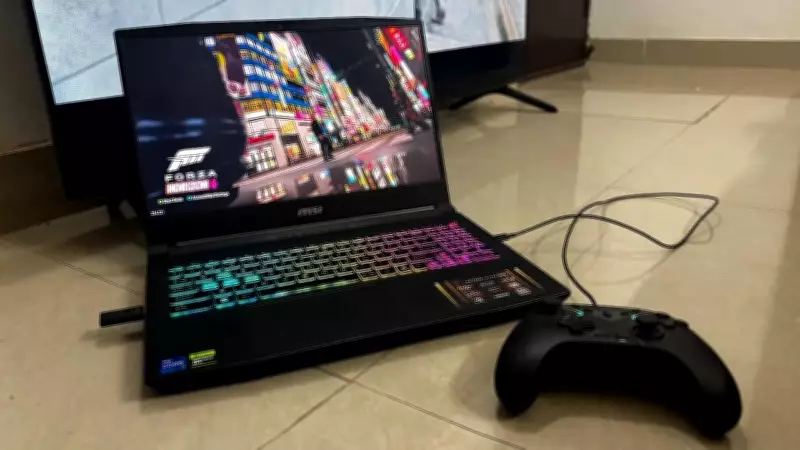
The MSI Katana series has long occupied an interesting middle ground in the gaming laptop market. These machines are capable of handling demanding titles yet affordable and lightweight enough to carry without complaint. Priced at Rs 1,30,000, the Katana 15 HX B14WFK is the middle-ground variant in the B14W family, and we tested the one paired with Intel's 14th Gen Core i7 HX processor and Nvidia's GeForce RTX 5060 GPU. With this laptop, MSI targets users who want genuine gaming muscle without committing to a desktop-replacement behemoth. We tested the laptop for several weeks, covering demanding gaming sessions, creative workloads, and everyday productivity. Here is what we found.
Design and Build
The Katana 15 HX B14WFK's all-black chassis carries MSI's dragon-crest branding, and the overall design language leans heavily into the aesthetic of a traditional gaming laptop. This includes angular lines, a vented rear, and a lid that reveals subtle texture under angled light. It is not subtle hardware, and whether that reads as confident or loud will depend entirely on personal taste. At 2.4 kg and 25.5 mm thin, the laptop sits in a different category entirely from desktop-replacement machines that double as weight-training exercises. Carrying the Katana 15 between rooms, slipping it into a backpack, or taking it to a cafe is a reasonable proposition. The laptop has a small footprint and sits comfortably on a standard desk without taking up too much space.
Build quality feels appropriately solid for the price bracket. The lid flexes a little when pressed hard, as is typical for this class of machine. In normal use, nothing creaks or moves in a way that makes you worry about the structure. The hinge operates smoothly throughout its range and holds the display firmly in position once set. The keyboard is one of the Katana's stronger design features. The 4-Zone RGB full keyboard layout includes highlighted WASD keycaps and a dedicated numpad, which proved useful during strategy sessions and spreadsheet work. The 1.7 mm key travel provides clear tactile feedback for both typing and gaming, and key inputs during fast-paced gameplay registered smoothly without missed presses. The WASD highlighting is a nice touch, making keys easy to pick out even in low light during late-night sessions.

Special mention should be made of the touchpad. MSI says it is 31% larger than the last generation, and it certainly feels that way. The larger surface offered ample room for multi-touch gestures, and the glass finish responded smoothly to fingertip movement. For productivity tasks like scrolling through documents and switching between browser tabs, an external mouse was not always necessary, though for shooting games, a dedicated mouse was still needed. The chassis readily attracts dust and fingerprints, particularly around the palm rests and the lid. After a full gaming session, smudges were visible across the darker surfaces. A quick wipe with a microfibre cloth resolves this, but users who prefer a clean appearance will need to factor in more frequent cleaning.
Display
The MSI Katana we tested shipped with a 15.6-inch QHD display (2560x1440) and a 165 Hz refresh rate. This configuration delivers a clear improvement in visual detail during both gaming and general use. The increased pixel density also benefits text in productivity apps, making long reading and writing sessions feel more comfortable. The 165Hz refresh rate helps with motion handling for faster titles like Valorant and Counter-Strike 2, providing smooth movement with stable tracking even during fast camera movements. The panel delivers balanced colour reproduction, suitable for gaming and light creative work. Skin tones and ambient lighting look natural, and brightness is sufficient for indoor use in normal lighting conditions.
The webcam is one of the laptop's weakest points. A 720p HD sensor at 30fps is adequate for occasional video calls, but its limitations become apparent in challenging lighting or fine detail. Faces appeared softer than the clarity offered by 1080p and higher cameras now common on business laptops. For users who regularly rely on video conferencing or streaming, an external webcam would be an important addition.

Performance and Software
The Intel Core i7-14650HX processor handles demanding workloads without hesitation. Paired with 16GB RAM and 1TB storage, the system managed heavy multitasking comfortably throughout testing. Running multiple browser windows with dozens of tabs open alongside Discord, a game client, and several background utilities produced no perceptible slowdowns. The Nvidia GeForce RTX 5060 Laptop GPU delivered stable performance across a range of titles on the QHD panel. With high settings enabled, frame rates remained consistent, especially when DLSS 4 was active, helping balance visual quality and performance using the Blackwell architecture's AI features. While playing Cyberpunk 2077 with Ray Tracing enabled at medium and DLSS in quality mode, the FPS ranged from 55 to 65. In Indiana Jones and the Great Circle, ray tracing was enabled at QHD resolution, with consistent performance above 60 fps in almost all cases. DLSS 4 multi-frame generation helped sustain smoother output in visually dense environments, reducing the impact of heavier workloads on the GPU.
The Discrete Graphics Mode via MUX design proved its worth in practice. Disabling the Optimus switching and running directly through the discrete GPU provided a measurable boost in frame rates compared to hybrid mode, typically in the range of 10 to 15% in tested titles. This is a meaningful advantage in competitive gaming scenarios, and we appreciate its inclusion at this price point. The Cooler Boost 5 cooling mechanism, with its dual fans, five heat pipes, and MSI's shared-pipe CPU-to-GPU technology, provided adequate temperature management during heavy operation. During intensive gaming, the CPU temperature ranged from 85 to 95 degrees centigrade, an ideal range for such processors. However, the GPU temperatures were quite moderate, ranging from 75 to 85 degrees centigrade. It is clear that using the shared heat pipe helps manage the thermal load across the two heat sources. Nonetheless, fan noise at peak operation was noticeable but not a deal breaker. In a silent room playing an intense game, the fans were louder than any background noise. As is typical for games at normal volume, whether on headphones or external speakers, the noise was not too bothersome. Users who prefer quiet operation and plan to game without audio peripherals should be aware that the fans are assertive when needed.
The MSI AI Engine adapts performance profiles intelligently across different workloads. Transitioning from a web browsing session directly into a game triggered a shift in fan behaviour and power delivery without requiring manual intervention. Creating a custom performance profile through the MSI Center software took only a few minutes and allowed fine-tuning of fan curves and power limits beyond the default presets. MSI App Player enables running mobile games on the laptop, which proved functional for testing a handful of titles. The integration is seamless enough to be a genuine convenience for users who play mobile games, rather than a gimmick bolted onto the feature list.
Connectivity
Port selection on the Katana 15 HX B14WFK covers the essentials without excess. The side panels offer three USB 3.2 Gen2 Type-A ports alongside a single USB 3.2 Gen2 Type-C port supporting DisplayPort and Power Delivery 3.0. The Type-C port also accepts up to 100W of charging input at the system level. An RJ45 Gigabit LAN port provides a wired networking option for users who prefer the stability of a physical connection during online gaming. The HDMI 2.1 port supports external displays up to 8K at 60 Hz or 4K at 120 Hz, covering the demands of virtually any external monitor a user at this price point would pair with this machine. Connecting a 4K display at 60Hz during testing worked without issue, and the image quality via HDMI was clean and sharp. One notable inclusion is the 3.5mm audio combo jack, a feature conspicuously absent from some competing machines and one that many users will appreciate for its simplicity and compatibility with a wide range of headsets. This model supports Wi-Fi 6E and maintained consistent connectivity throughout our testing period. During online gaming tests, we maintained low latency, with ping consistently below 30ms on a good network connection. Bluetooth 5.3 enabled us to connect to peripheral devices wirelessly, such as headsets and controllers, with no disconnections even after extended use. For those who want to charge the battery using PD through its Type-C port, doing so can save you from having to use the heavy 240W barrel connector charger. However, according to MSI, PD is more effective during low-performance states while playing games. For optimal gaming performance, it is still advisable to use the 240W charger.
Battery Life
The 4-cell, 75Whr battery reflects an honest compromise between the Katana's portability aspirations and the power demands of its components. During light productivity work, including document editing, web browsing, and media playback with the display at moderate brightness, the runtime ranged from approximately 3.5 to 4 hours. For a gaming laptop at this weight class, that is a serviceable figure for casual mobile use. Gaming unplugged is a shorter affair. With demanding titles running at high settings and the display at full brightness, the battery depleted in roughly 70 to 90 minutes. This is broadly expected given the power draw of the i7-14650HX and RTX 5060 under load, and aligns with what similar hardware typically delivers. Users planning extended gaming sessions should stay near a power outlet. Reducing display brightness, switching the GPU to integrated-only mode via the MUX design for light tasks, and enabling a battery-saving performance profile extended unplugged runtime noticeably during productivity work. The battery saver mode is worth enabling when the machine is away from power, and the task at hand does not require the discrete GPU. The included 240W adapter is substantial in size and weight, and travelling with it adds a meaningful amount to any bag. It remains compact enough for desk use but demands consideration when packing for mobility. The PD charging support does offer a secondary option for lighter travel, provided performance expectations are adjusted accordingly.
Verdict
This product is priced at Rs 1,30,000 and has established a distinct place in the gaming laptop market by offering a laptop that is actually worthy of the name, with 14th Gen Intel processors, RTX 5060 graphics, and a QHD screen, all packed into a laptop weighing just 2.4 kg. It is for people who do not have any restrictions on their desktop setup but want to enjoy desktop-level gaming from the convenience of their notebook.
