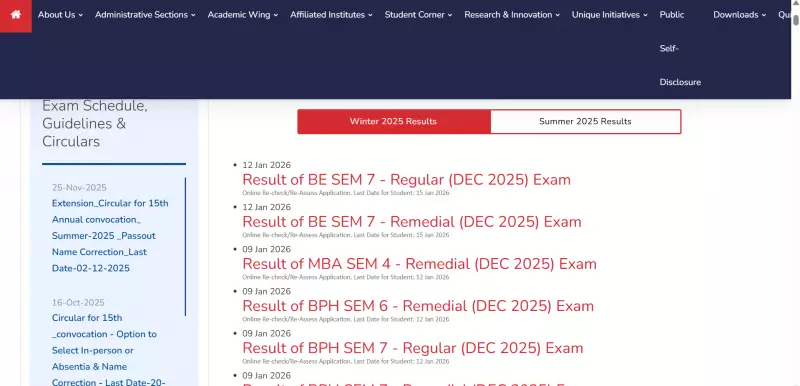
GTU Declares Winter 2025 Results for Multiple Courses
Gujarat Technological University has officially announced the Winter Session 2025 examination results. The university released scores for various undergraduate and postgraduate programs this week.
Students who appeared for the December 2025 semester exams can now access their results online. The GTU result portal is live and accepting login requests.
Available Results on GTU Portal
The university published results for several key courses and semesters. Students should check the official website for their specific program.

- BE Semester 7 – Regular
- BE Semester 7 – Remedial
- MBA Semester 4 – Remedial
- BPH Semester 6 – Remedial
- BPH Semester 7 – Regular
- BPH Semester 7 – Remedial
- IC Semester 5 – Regular
- IC Semester 5 – Remedial
- BH Semester 6 – Remedial
- BA Semester 7 – Regular
- DV Semester 3 – Regular and Remedial
- DV Semester 4 – Remedial
- DV Semester 5 – Regular
This comprehensive list covers most major programs offered by GTU. The university expects to release additional results in the coming days.
Re-checking and Re-assessment Application Window
GTU has opened the online application process for re-checking and re-assessment. Students who want their papers re-evaluated must apply within specific deadlines.
The university set different dates for various courses:
- BE Semester 7 (Regular and Remedial) applications close on January 15, 2026.
- MBA, BPH, IC, BH and BA course applications close on January 12, 2026.
Students should submit their requests online before these deadlines. Late applications will not receive consideration.
Step-by-Step Guide to Check Results
Checking your GTU Winter 2025 results is a straightforward process. Follow these simple steps to access your scores.
- Visit the official GTU results website through your browser.
- Click on the relevant course and semester result link.
- Enter your enrollment number, seat number, and password.
- Submit the details for verification.
- View your result on screen and download it for future reference.
The portal requires accurate login credentials. Students should double-check their details before submission.
Important Instructions for Students
GTU officials advise students to carefully review all details on their result sheets. Any discrepancies should prompt immediate action.
Students must apply for re-checking or re-assessment within the announced deadlines. The university will not entertain requests after the closure dates.
Regular monitoring of the official GTU website is essential. The university posts all updates and notifications there first.
Download and save your result document immediately. This prevents potential access issues later.