

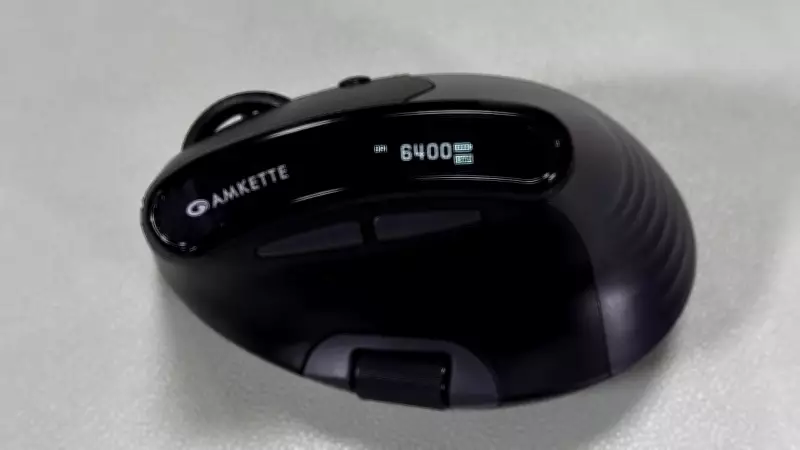
The computer mouse has evolved from a simple pointing device into a tool that directly impacts productivity and comfort. With more people working extended hours across spreadsheets, documents, editing timelines, and multiple screens, ergonomic mice have shifted from niche accessories to essential work tools. This is the core idea behind Amkette's XS Natural Plus.
Priced at Rs 2,199, the Amkette XS Natural Plus targets users seeking a more natural hand position than a standard mouse, without entering the premium productivity category. On paper, it ticks most boxes, including multi-device connectivity, silent buttons, customizable controls, and a vertical-style ergonomic design. We used the mouse for work, browsing, and editing tasks over several days, and here is our assessment.
Design and Comfort
The first thing you notice about the XS Natural Plus is its shape. Unlike a traditional flat mouse, this one keeps your wrist at a more relaxed angle, with the back of the hand facing to the right rather than upward. It takes some time to adjust, especially if you are switching from a compact mouse, but after a few days, the difference becomes noticeable during longer sessions.

The curved body supports the palm's natural shape and reduces the need to twist the wrist inward. During testing, the design felt more comfortable for extended spreadsheet work, document editing, and general browsing. The mouse is slightly bulkier than standard office mice, but its shape distributes grip pressure more evenly across the hand.
The matte ABS plastic finish feels appropriate for the price, while textured sides improve grip during quick movements. At 95 grams, the weight is moderate—neither very light nor too heavy. The PTFE feet underneath glide smoothly across most desk surfaces, including a wooden table without a mousepad.
We particularly appreciated the silent Huano switches. The buttons remain tactile but avoid the sharp click sound common in office mice. Whether during late-night work or meetings, the quieter clicks make daily usage less distracting.
The OLED display near the thumb area is a small addition that proves more practical than expected. It shows battery percentage, DPI level, and active connection mode in real time, so you do not always need to rely on software to check status.
Performance and Connectivity
The XS Natural Plus supports multiple connection modes: 2.4GHz wireless, Bluetooth, and wired connectivity. You can connect the mouse to several devices simultaneously and switch between them using a button underneath. During testing, switching between a Windows laptop and a MacBook worked reliably. Bluetooth pairing was straightforward, while the bundled 2.4GHz dongle offered a more responsive experience for precise cursor movement. We did not encounter random disconnects or noticeable lag during normal productivity use.
The mouse offers DPI settings from 400 to 6400. Most users may stay around the default 1600 DPI, but the flexibility helps depending on screen size and workload. Lower DPI levels suit document editing, while higher sensitivity makes navigating large monitors faster.
Scrolling performance was smooth. The vertical scroll wheel is smooth without being overly loose, and the horizontal wheel becomes useful for navigating wide spreadsheets or video editing timelines. This feature may seem secondary initially but becomes part of the workflow once you get used to it.
We also tried the mouse with shooting games like Call of Duty: Black Ops 7 to test faster movements. While the XS Natural Plus is designed for productivity rather than competitive gaming, its ergonomic shape surprisingly reduced wrist strain during longer gameplay sessions. The textured grip and stable palm rest made aiming feel precise, especially during prolonged gaming when comfort is essential. The 2.4GHz wireless function provided seamless tracking with no input lag.
Amkette offers web-based customization software for Windows and macOS. Through the software, users can assign shortcuts, configure buttons, and set macros. The interface is straightforward, though not as extensive as some premium productivity ecosystems.

Battery life was consistent throughout testing. Amkette claims up to 135 hours, and while real-world usage depends on connection mode and workload, we had no problem using the mouse for a week without charging. The addition of USB Type-C charging is convenient.
Verdict
The Amkette XS Natural Plus focuses less on flashy additions and more on improving day-to-day comfort. Priced at Rs 2,199, it offers an ergonomic design, silent buttons, and multi-device flexibility, creating a practical experience for long working hours.
However, the transition from a standard mouse requires an adjustment period. Users with smaller hands may initially find the shape slightly bulky. But once familiar, the relaxed wrist positioning and quieter operation become easier to appreciate during regular work.
Features like the OLED display, horizontal scrolling, and customizable controls add utility without making the mouse feel overly complicated. For users who spend most of their day navigating documents, spreadsheets, or multiple screens, the XS Natural Plus is a comfortable alternative to a conventional office mouse at an affordable price.
