

Unlocking Your Code Vein 2 Pre-Order and Edition Rewards
If you have pre-ordered Code Vein 2 or purchased a higher edition of the game, your additional items are securely linked to your platform account. These rewards are not lost and do not require any separate downloads within the game. To access them, you simply need to navigate to the appropriate menu or visit specific vendors in the game world.
Understanding Code Vein 2 Edition Rewards
The game does not automatically distribute all bonus items at once. Instead, cosmetic outfits are equipped through the customization interface, while certain weapons must be purchased from shops located in the main hub area. Once you familiarize yourself with the process, every bonus becomes straightforward to access.
What Each Edition of Code Vein 2 Offers
Your rewards depend entirely on which version of Code Vein 2 you own. Here is a detailed breakdown:

Standard Edition Pre-Order Items
- Stylized Forma Set: A unique cosmetic set for character customization.
- Twin Fangs of the Lone Wolf: Dual blades featuring special engravings and a lunging attack capability.
- Forma Face Paint: An exclusive face paint option to personalize your character's appearance.
Deluxe Edition Items
This edition includes everything from the Standard Edition, plus:
- Custom Outfit Pack: Additional costume sets for enhanced visual variety.
- Three Extra Costume Sets: More outfits to diversify your character's look.
- One Bonus Weapon: An additional weapon to expand your combat options.
- Mask of Idris Story Expansion: A narrative DLC planned for future release, not available at the game's launch.
Ultimate Edition Items
The Ultimate Edition encompasses all Deluxe Edition content, along with:
- CODE VEIN Character Costume Set: Outfits inspired by characters from the original game.
- Six Outfits Based on First Game Characters: Additional cosmetic options paying homage to the series' legacy.
- Digital Mini Artbook: A collection of artwork accessible outside the game.
- Digital Soundtrack: The game's musical score available for separate listening.
All these rewards are connected to your platform account through Bandai Namco Entertainment. They are not restricted to a single save file, meaning any new character you create under the same account can utilize them.
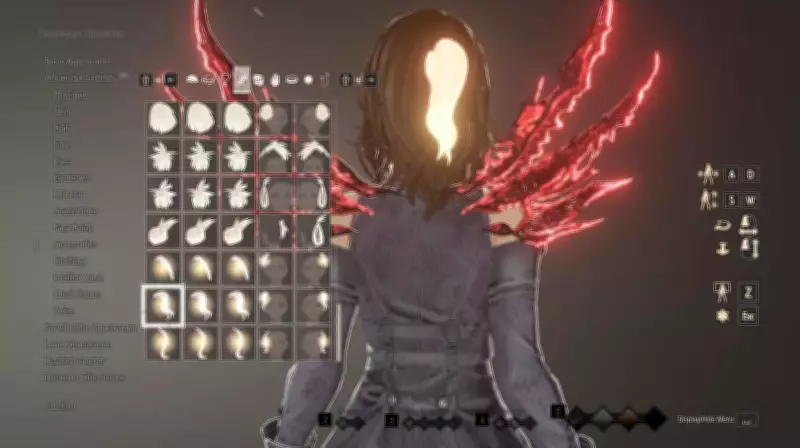
How to Equip Bonus Outfits and Face Paint in Code Vein 2
Cosmetic items are unlocked immediately upon starting or loading a save game. The process involves:
- Start a New Game or Load Your Character: The game automatically verifies your account and unlocks cosmetics in the background.
- Access the Outfits and Accessories Menu: Open this menu from the pause screen to view available options.
- Change Your Outfit:
- Navigate to the Body section.
- Scroll through the list until you locate the bonus costumes.
- Select your preferred outfit to apply it.
- Apply the Face Paint:
- Open the Face section within the customization menu.
- Choose the Forma Face Paint option and confirm your selection.
You can modify your appearance at any time later from the main hub, ensuring you are not permanently committed to your initial choices.
How to Obtain Pre-Order Weapons in Code Vein 2
Bonus weapons are acquired through vendors rather than being directly added to your inventory. Follow these steps:

- Progress Through the Story: Play until you reach the main hub area.
- Locate the Weapon Merchant: Find the vendor named Jadwiga.
- Open Her Shop: Access her inventory to view available items.
- Identify Bonus Items: Look for weapons marked as bonus or pre-order offerings.
- Purchase Using Haze: Buy these items using Haze, the in-game currency.
If you lack sufficient Haze, defeat enemies in nearby areas to earn more, then return to the shop to complete your purchase.
Future DLC and Digital Extras in Code Vein 2
Mask of Idris Expansion
- Included with Deluxe and Ultimate editions.
- Not playable at launch.
- Scheduled for release in January 2027.
- After release, it will appear as a new story section accessible from the menu or through an NPC in the hub.
Digital Artbook and Soundtrack
- Accessible outside normal gameplay.
- On PC, they typically appear as separate items in your game library.
- On consoles, check the game's extras or special content section.
Release Dates and Early Access
- Standard Edition: Unlocks on January 30, 2026.
- Deluxe and Ultimate Editions: Offer early access approximately three days prior, depending on your region.
Since rewards are account-based, you retain them on every new save as long as you use the same account.
Fixing Common Problems in Code Vein 2
Outfits Do Not Appear
- Ensure you purchased the correct edition of the game.
- Verify that you are logged into the account used for the purchase.
- Restart the game and recheck the customization menu.
Weapons Are Missing from the Shop
- Advance further in the story until the main hub and vendor are fully unlocked.
- Note that some items linked to future DLC will not appear until that content is released.
Utilizing Your Bonuses in Code Vein 2
Once you equip the face paint, switch into a bonus outfit, and acquire the Twin Fangs of the Lone Wolf, your character gains enhanced visual customization and an additional weapon option from the outset.
It is important to emphasize that these items do not bypass game progression. They simply provide more avenues for character building and styling. As long as your account owns the appropriate edition, you can access all rewards on any character you create.





