

Microsoft has started rolling out a significant set of updates to two of its most iconic applications on Windows, Paint and Notepad, infusing them with artificial intelligence capabilities that represent a notable departure from their traditionally straightforward functions. These enhancements are currently accessible to Windows Insiders who are using Windows 11 in the Canary and Dev channels, marking an exciting phase in the evolution of these classic tools.
Paint's Innovative Colouring Book Feature
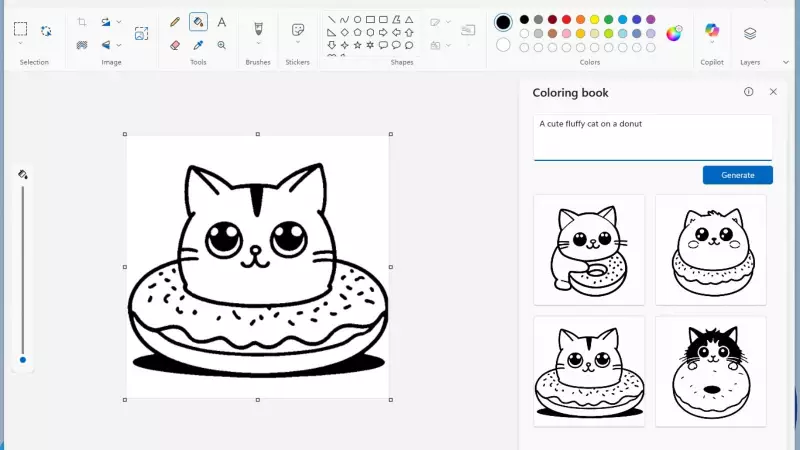
One of the most attention-grabbing upgrades is in Microsoft Paint, which now includes a new feature dubbed the 'colouring book.' This functionality allows users to create black-and-white colouring pages effortlessly by using simple text prompts. Available in Paint version 11.2512.191.0, the feature can be accessed directly through the Copilot menu, making it user-friendly and intuitive.
Users simply need to describe what they envision, such as a playful animal, a scenic landscape, or a cartoon-style object, and the app generates four distinct outline-style images. These images can be added directly to the canvas, where they can be coloured digitally within the app or printed out for traditional colouring activities with pencils or crayons, offering a versatile and creative experience for all ages.

Practical Enhancements in Paint
Beyond the AI-driven image generation, Paint is also receiving a more practical improvement with the introduction of a new fill tolerance slider. This tool provides users with finer control over how the Fill tool operates, enabling more precise colouring of areas without unwanted spillover. Unlike the Colouring book feature, which may have some hardware limitations, this enhancement is expected to be released more widely, benefiting a broader user base.
Notepad's Modern AI-Powered Refresh
Another classic Windows application, Notepad, is undergoing a modern transformation with its new version, 11.2512.10.0. This update brings more fluid AI-powered text features, including Write, Rewrite, and Summarise functions. A key improvement is that AI-generated text will now be produced incrementally, allowing users to view the output as it is generated rather than waiting for the final result. This change aims to make text editing and optimisation feel more dynamic and fast-paced, enhancing productivity.
User-Friendly Interface and Enhanced Functionality
The Notepad update also introduces a new welcome screen layout that summarises the app's capabilities, making it easier for new users to get started quickly. Additionally, Microsoft has improved Notepad's Markdown functionality by adding new features such as strikethrough and nested lists. These enhancements are particularly beneficial for users who rely on the app for text formatting, providing more tools for efficient document creation and management.
Overall, these updates to Paint and Notepad signify Microsoft's commitment to integrating AI into everyday applications, offering users innovative and practical tools that blend creativity with functionality. As these features roll out, they are set to redefine how people interact with these familiar apps on Windows 11.






