

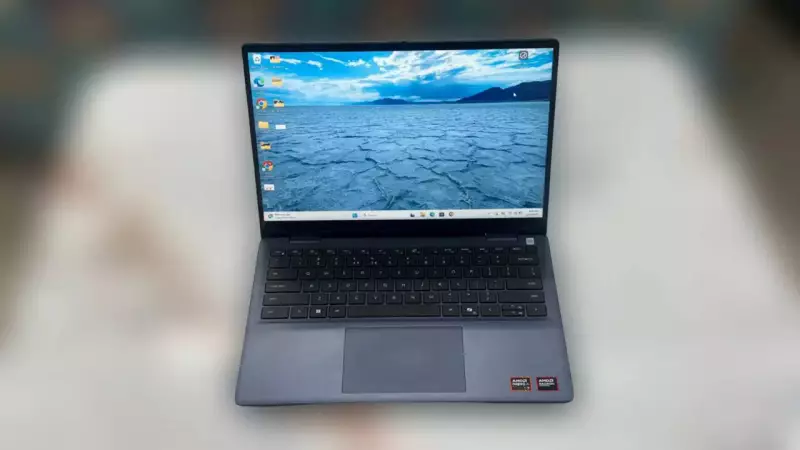
Dell 14 Plus 2-in-1 Review: A New Era of AI-Enabled Business Laptops
Laptops with integrated AI hardware are gradually becoming the new industry standard. The Dell 14 Plus 2-in-1 stands as one of the pioneering machines fully embracing this technological shift. This device marks a significant transition for Dell as the company moves away from familiar branding like Inspiron and XPS. The Dell 14 Plus 2-in-1 represents the beginning of Dell's refreshed product lineup, effectively replacing what previously occupied the 'Inspiron Plus' category.
Designed for the Modern Professional
Dell positions this laptop specifically for work-first users who demand a stable business machine. The company emphasizes modern AI hardware, extended battery life, and robust enterprise features. Powering this device is Intel's Core Ultra 7 processor featuring an integrated Neural Processing Unit (NPU). This combination, along with 16GB of LPDDR5X RAM and a 512GB SSD, enables local AI tasks without relying on cloud services. These tasks include real-time transcription, advanced noise reduction, and on-device processing.
After extensive testing, we present our comprehensive evaluation of this business-focused 2-in-1 convertible.

Practical Design and Solid Build Quality
The Dell 14 Plus 2-in-1 avoids flashy aesthetics in favor of a clean, professional appearance. Its simple design integrates seamlessly into office environments and business meetings. We found the aluminum construction remarkably sturdy, with the chassis feeling solid during daily use. This practical approach reflects Dell's new branding direction that prioritizes functionality over form.
The hinge mechanism deserves special mention for its tightness and stability. It keeps the screen firmly positioned when transitioning between laptop, tent, and tablet modes. Weighing just under 1.6 kilograms, this isn't the lightest 14-inch 2-in-1 available. However, we carried it comfortably during commutes and office travel without significant discomfort.
Business-friendly features include a fingerprint-enabled power button and a physical shutter for the infrared webcam. Port selection remains practical with two USB-C ports, one USB-A port, HDMI 2.1, and a standard headphone jack. Overall, the design emphasizes durability and functionality, aligning perfectly with Dell's renewed enterprise-first identity.
Display That Supports Long Work Hours
Dell equips this laptop with a 14-inch 2.5K anti-glare display featuring ComfortView Plus technology. The company claims this combination reduces blue light emission and minimizes eye strain during extended work sessions. Our testing confirmed these benefits during prolonged document editing, spreadsheet work, video conferences, and web browsing.
Indoor lighting presented no visibility issues, with the screen providing adequate brightness. The anti-glare coating effectively reduced reflections, eliminating frequent screen angle adjustments. The 2.5K resolution delivered exceptionally sharp text and clear visual details across all content types.
Touch responsiveness in tablet mode proved accurate and consistent for browsing, scrolling, and app interactions. Switching between laptop and tablet modes didn't impact performance in any noticeable way.
We evaluated various video content including web series like Stranger Things, Bollywood films such as Haq, and diverse YouTube videos. Colors appeared balanced and natural rather than artificially oversaturated. The viewing experience remained consistent, with minimal color or brightness shifts when viewing from different angles.
Outdoor use required maximum brightness settings for optimal clarity, but content remained readable even in bright environments. For everyday work tasks and general multimedia consumption, the display provides a stable and comfortable visual experience.
Performance That Handles Business Demands
The Intel Core Ultra 7 processor with its integrated NPU delivers consistent, reliable performance for daily business tasks. We tested the laptop extensively with routine office work including email management, video conferencing, document editing, web browsing, and multitasking across multiple tabs. The device handled these activities comfortably without noticeable slowdowns.

Applications launched quickly, and task switching felt smooth throughout our testing. The laptop managed background processes efficiently, even during video calls with multiple applications running simultaneously. For standard business workloads like presentations, spreadsheets, light photo editing, and collaboration tools, performance remained steady and predictable.
Integrated AI features operated quietly in the background without requiring manual configuration. Noise reduction during calls and local processing for supported tasks functioned seamlessly without impacting system performance. However, users expecting revolutionary AI-driven workflow changes might find these features subtle rather than transformative.
Thermal management performed effectively during our evaluation. The laptop remained mostly quiet under normal workloads, with fans becoming audible only during intensive multitasking or extended video calls. Heat generation remained minimal, keeping the device comfortable for extended use on desks or laps.
Battery Life That Lasts the Workday
Battery performance proved impressive in real-world testing. With mixed usage including browsing, document work, media streaming, and video calls, the laptop comfortably lasted through a full workday on a single charge. Lighter workloads extended battery life even further without requiring power connections.
Heavier usage scenarios like continuous video conferencing or running multiple applications at high brightness naturally accelerated battery drain, but results remained within expected parameters for this category.
Keyboard and Audio Experience
The full-size keyboard clearly targets extended work sessions. During daily use, we found the keys comfortable for typing emails, documents, and reports. Adequate key travel and familiar layout facilitated quick adjustment without a learning curve. Extended typing sessions didn't cause noticeable fatigue, making this keyboard suitable for productivity-focused tasks.
Backlighting proved valuable in low-light environments, while the large, centrally positioned trackpad offered ample space for gestures and cursor movement. Responsiveness remained excellent for taps, swipes, and multi-finger gestures. Scrolling and zooming operated smoothly without accidental click issues.
For audio needs, stereo speakers with Dolby Atmos tuning delivered clear voice reproduction during video calls, even at moderate volume levels. Video and music playback produced clean audio, though lower frequencies lacked depth. Volume levels suffice for personal use in quiet environments.
Final Verdict: A Dependable Business Partner
Priced at Rs 95,599 for the base configuration, the Dell 14 Plus 2-in-1 occupies the upper mid-range business segment. This category demands reliable performance, extended uptime, and strong security features. The laptop successfully combines modern hardware with thoughtful design for professionals and enterprise users.
Daily performance remains smooth for productivity tasks including document editing, spreadsheet management, web browsing, video conferencing, and content review. Battery life reliably covers typical workday requirements, with fast charging support minimizing downtime between sessions.
The Dell 14 Plus 2-in-1 represents a strong choice for users prioritizing consistent performance, business-ready features, and reliable battery life over cutting-edge design or entertainment capabilities. For professionals, hybrid workers, and enterprise deployments, it delivers a balanced combination of strengths that establish it as a dependable work partner. This becomes particularly relevant as AI-ready devices transition from novelty to everyday reality in the professional landscape.





