

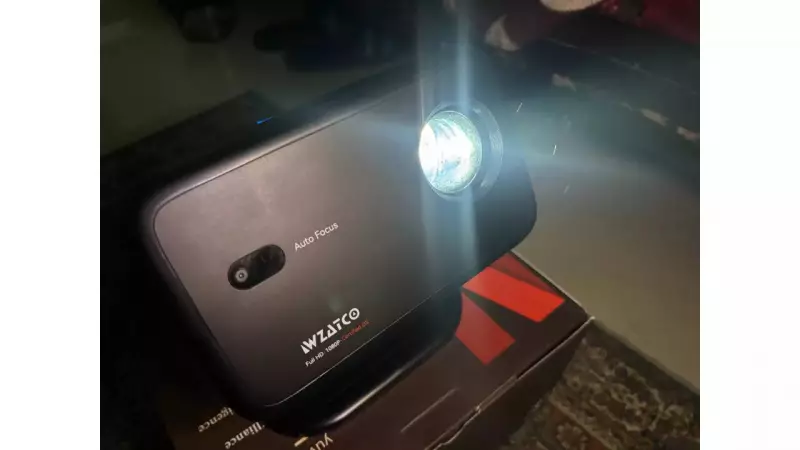
Wzatco Yuva Vibe Projector: A Comprehensive Review
Home entertainment has transformed dramatically. Traditional setups are giving way to advanced projectors. The Wzatco Yuva Vibe projector enters this evolving market. It promises a feature-rich experience at an affordable price point. Priced at Rs 14,990, this device offers native Full HD visuals, Netflix certification, and even ChatGPT integration.
We spent several weeks testing the Wzatco Yuva Vibe. Our tests covered various scenarios. We used it for weekend movie nights, intense gaming sessions, and outdoor projections. This review details our real-world experiences with this projector.
Design and Build Quality
The design immediately impressed us. The 270-degree rotation capability stands out. Unlike many projectors that need careful positioning, this one adjusts freely. We placed it on a side table in our living room. Simply rotating the projection head aimed it perfectly at the wall. Repositioning the entire unit was unnecessary.

Its compact size made movement easy. We shifted it from the living room to the bedroom one evening. The whole process took less than a minute. The projector supports table, wall, and ceiling mounting. This flexibility suits both permanent and temporary setups.
Ports are conveniently located on the back. You get HDMI, USB, AV, and audio out options. Multiple connectivity choices proved useful. We switched between a laptop, Fire TV Stick, and gaming laptop during testing.
One minor letdown was the lack of a carrying bag. For a portable projector, a protective case would be helpful. This is especially true if you plan outdoor use or travel to friends' places.
Performance and Visual Quality
The Wzatco Yuva Vibe delivers native Full HD 1080P resolution. It also supports 4K HDR. The difference in clarity is noticeable. We tested it with Netflix shows, YouTube videos, and 4K movie trailers. Colors appeared vibrant. Details remained sharp even on larger screens.
Brightness is a major strength. The 14,000-lumen output performed well. We projected a cricket match on a Sunday afternoon. Curtains were partially open. The image remained reasonably visible. For darker content like thriller movies, drawing curtains enhanced the experience significantly.
We experimented with various screen sizes. We tried from 80 inches to over 150 inches. The sweet spot seemed around 100-120 inches. The image stayed crisp without losing brightness. At a terrace party, we pushed it to nearly 200 inches on a white wall. Some brightness was lost, but the experience remained enjoyable.
Autofocus and auto-keystone correction worked quite well. Every time we repositioned the projector, the image auto-adjusted within seconds. We placed it on a coffee table, bookshelf, and even a stack of cushions. The obstacle avoidance feature also helped. It automatically adjusted when we accidentally placed a plant too close.
Smart Features and Connectivity
Netflix certification is a clear advantage. We logged into our Netflix account and started streaming immediately. The interface was smooth. We noticed occasional lag when switching between apps or scrolling through libraries.
The Android 13-based WhaleOS operating system runs the show. It comes with pre-installed OTT apps. These include Netflix, YouTube, Disney+ Hotstar, and Prime Video. These apps worked adequately for basic streaming. For the smoothest experience, we used a Fire TV Stick connected via HDMI. This was especially true for apps like Prime Video that sometimes lagged.
WiFi 6 support meant faster streaming and better stability. We connected to our home's 5GHz network. Content loaded quickly with minimal buffering. Bluetooth 5.0 connectivity was equally useful. We paired it with external speakers for a cinema-like audio experience during action movies.
The built-in 5W speakers are decent for casual viewing. They work well in small- to medium-sized rooms. We watched comedy shows, and dialogue was clear. For movies with intense soundtracks or outdoor viewing, we strongly recommend external speakers. During our terrace screening, we paired a portable Bluetooth speaker. Audio quality improved dramatically.

Unique Features: ChatGPT Integration and Gaming
ChatGPT integration is a standout feature. Using voice commands through the remote, we could search for content. We got movie recommendations and controlled basic functions. It felt futuristic. We used it more for novelty than necessity. Still, it's a nice touch that sets this projector apart.
Gaming performance deserves special mention. We connected a gaming laptop. The experience was smooth with minimal input lag. Playing action games on a 120-inch screen was immersive. The 60 Hz refresh rate handled fast-paced sequences well. Autofocus kept the image sharp during extended gaming sessions.
Screen mirroring worked seamlessly with both Android and iOS devices. We tested it with an Android phone using Miracast. It connected instantly. For an iPhone, we used AirPlay. After ensuring both devices were on the same WiFi network, mirroring was smooth. We streamed photos and videos from a recent trip. Everyone enjoyed the big-screen slideshow.
Practical Tips and Observations
We learned a few tricks during testing. Placing the projector about 6-8 feet from the wall gave the best image size and clarity. Keeping it at least 2 feet away from walls ensured proper ventilation. We noticed slight warming when placed too close initially.
A dark room brought out the best colors and contrast. This was especially true for HDR content. The remote control is feature-rich. It has direct app buttons and voice assistant access. However, it had occasional Bluetooth connectivity hiccups. A couple of times, it became unresponsive and required reconnecting. IR functionality worked as a backup. But having to point directly at the projector was less convenient.
Keep the projector in a relatively dust-free environment. After a few weeks of use, we noticed dust accumulation on the lens. A quick wipe with a microfibre cloth restored clarity. This is something to remember for maintenance.
Final Verdict
The Wzatco Yuva Vibe projector stands out as a well-rounded option. It offers quality home entertainment without excessive spending. The Full HD 1080P resolution, high brightness, and smart features deliver real value at Rs 14,990.
This projector handles multiple use cases effectively. It works for movie nights, gaming sessions, presentations, and outdoor screenings. The ChatGPT integration and 270-degree rotation add modern conveniences. They enhance the overall experience.
Remote connectivity could be more reliable. Pre-installed apps occasionally lag. These are minor issues in an otherwise solid package. For the best experience, pair it with external speakers. Use it in a controlled lighting environment when possible. If you need heavy app usage, connect a streaming stick for smoother navigation.
The Wzatco Yuva Vibe is a compelling choice for anyone upgrading their home entertainment setup. It combines performance, features, and affordability in a compact design.





