YouTube Transcript Hack: Skip Long Videos & Find Info Instantly
We have all experienced that frustrating moment: you click on a YouTube video expecting a quick answer, only to discover it runs for 45 minutes and is filled with unnecessary tangents. Tutorials, interviews, lectures, and explainer videos often hide the most valuable insights within lengthy runtimes, making it a challenge to extract useful information efficiently.
This is where YouTube's transcript feature emerges as a true game-changer. Instead of wasting precious time scrubbing through the timeline or enduring the entire video, you can scan the transcript like a searchable article. This powerful tool allows you to instantly determine if the video is worth watching in full and enables you to jump directly to the exact segment you need.
How the YouTube Transcript Feature Transforms Your Experience
By reading the transcript first, you can rapidly identify the sections that matter most. This is particularly beneficial for lectures, podcasts, tutorials, and interviews, where key insights may be buried among hours of content. The transcript hack converts long-form video into quick, accessible text, saving time, reducing frustration, and making YouTube a far more efficient platform for learning and discovery.

Step-by-Step Guide to Using YouTube's Transcript Feature
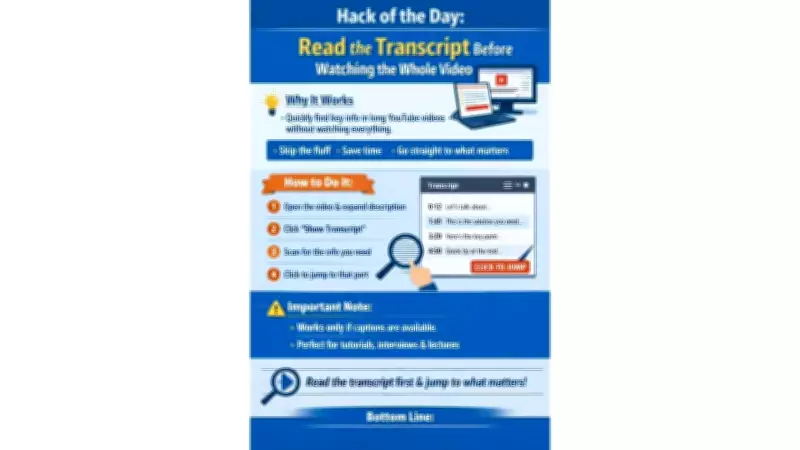
- Open the YouTube video in your web browser.
- Expand the description area located below the video player.
- Click on the "Show transcript" option if it appears in the menu.
- Scan the transcript to locate the specific segment that interests you.
- Jump directly to that moment by clicking on the matching line in the transcript.
Important Considerations for This Time-Saving Hack
This hack only functions for videos that have captions enabled. While transcripts may not always be perfect, they serve as a powerful shortcut for quickly pinpointing useful sections without committing to watching the entire video. Embrace this simple yet effective strategy to enhance your YouTube experience and maximize productivity.